Try any paid plan free for 14 days — no credit card, no commitment, no contract.14-day free trial on all paid plans — no card needed. Start free trial
Google Review Tracking & Monitoring
Connect your Google Business Profile, sync reviews automatically, and track rating changes over time. One dashboard for every location.
Who this is for
Solo business owners
1–3 locations. Need a simple view of rating and review count without logging into Google every day.
Multi-location businesses
Compare branch performance, spot which locations are trending up or down, and manage from one place.
Agencies & franchises
Centralize client or franchisee review data, export reports, and maintain oversight without credential sharing.
The problem
Google Business Profile shows your reviews, but it doesn't track history. You can't see how your rating changed over time, compare locations side-by-side, or get notified when new reviews land — not without checking manually.
For multi-location businesses, this means logging into each profile separately, losing track of which locations are improving and which are slipping. By the time you notice a downward trend, it's already weeks old.
How it works
- 1
Connect your Google Business Profile
Secure OAuth authentication. Takes 30 seconds. You maintain full control and can revoke access anytime.
- 2
Select locations to track
Choose which business locations you want to monitor. All existing reviews are imported on the first sync.
- 3
Reviews sync automatically
Depending on your plan, data refreshes quarterly, monthly, weekly, or daily. You can also pull manually anytime.
- 4
Track trends over time
Your dashboard shows rating history, review count growth, and year-over-year comparisons. Filter by location, date range, or star rating.
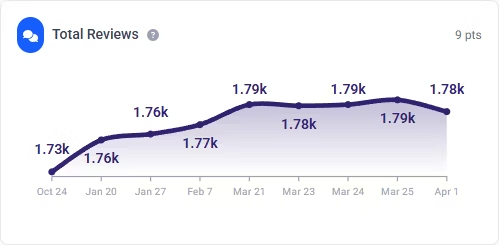
Demo data shown.
Sync frequency by plan
| Plan | Auto-refresh | Manual refresh | Locations |
|---|---|---|---|
| Starter (free) | Quarterly | 1/month | 3 |
| Personal | Monthly | 1/day | 8 |
| Professional | Weekly | Unlimited | 15 |
| Enterprise | Daily | Unlimited | 20+ |
Limitations
- ReviewPanel tracks Google Business Profile reviews only. Yelp, TripAdvisor, and other platforms are not supported.
- Reviews are not monitored in real-time. New reviews appear after the next scheduled sync or manual refresh.
- Google may occasionally delay or withhold review data through their API. This is outside our control.
FAQ
How do I connect my Google Business Profile?
Sign in with your Google account and authorize ReviewPanel via OAuth. You maintain full control and can revoke access from your Google account settings at any time.
Does ReviewPanel support Yelp or TripAdvisor?
No. ReviewPanel is built exclusively for Google Business Profile reviews — the ones on Google Search and Maps.
How quickly do new reviews appear?
After each scheduled sync or manual refresh. ReviewPanel does not receive real-time push notifications from Google — it checks for new data on a schedule.
Is there a limit on how many reviews can be tracked?
No limit on reviews. All reviews for your selected locations are imported and tracked. Location limits vary by plan.
Can I bring my own Google API credentials?
Yes. You can use our default credentials for quick setup, or configure your own custom OAuth credentials in settings.
What data does ReviewPanel store?
Review text, star rating, reviewer display name, review date, and your reply (if any). This data is used for your dashboard, analytics, widgets, and exports.
Useful next steps
Set a rating target before you start tracking
Explore all free Google review and local SEO toolsStart tracking your Google reviews
Free plan includes 3 locations with quarterly auto-refresh. No credit card required.