Network average rating
Brand-wide
Roll up Google stars across all franchise units for executive reporting.
Try any paid plan free for 14 days — no credit card, no commitment, no contract.14-day free trial on all paid plans — no card needed. Start free trial
For franchise networks and brand teams
Built for franchise networks. Manage Google reviews across all your locations with store-level dashboards, network-wide reporting, and tools designed for franchise operations teams.
Whether you support one new franchisee or a network of 50 units spread across your metro area and every suburb in between, ReviewPanel gives franchise operations one dashboard for Google reviews in every market. Compare unit performance by city, standardize reporting for field teams, and spot reputation issues before they spread across the brand.
Managing Google reviews across multiple franchise locations shouldn't require juggling dozens of accounts and spreadsheets.
Everything you need to manage reviews across your franchise network
View performance metrics for each franchise location individually. Track ratings, review counts, and trends at the store level.
Get a bird's-eye view of your entire franchise network. Compare locations, identify top performers, and spot areas needing support.
Daily automatic refresh of all location reviews. Never miss new feedback from any of your franchise locations.
Export supported review, location, analytics, and geo-grid reports for corporate reporting, franchisee meetings, or board presentations.
Send refreshed business-account metrics to an HTTPS receiver after each account refresh. Include HubSpot, Salesforce, or custom identifiers for routing by your own middleware or automation tooling.
Collaborate with operations and marketing teams using Owner, Admin, Member, and Client roles. Roles apply across the workspace, so separate workspaces are required when location access must be isolated.
Detect when Google removes reviews from any franchise location. Preserve evidence, spot patterns across your network, and build appeals.
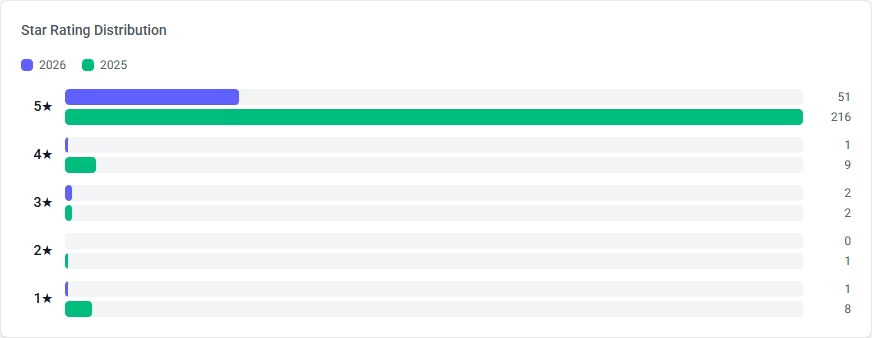
Rating distribution year-over-year
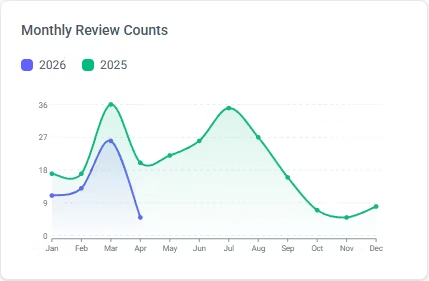
Monthly review volume comparison
How corporate teams, regional managers, and franchisees use ReviewPanel week to week.
Enterprise plan syncs daily. No one needs to log into individual Google accounts. Data flows in automatically.
Compare locations in the workspace, flag stores that need attention, and share findings in the weekly operations meeting.
Formatted PDF with network-wide metrics, top/bottom performers, and trend data. Attach it to the monthly operations report.
Use an HTTPS receiver and optional CRM identifiers to route refreshed account metrics into your existing workflow.
Monitor review performance across the entire network. Identify locations that need support, recognize top performers, and track the impact of corporate initiatives on customer satisfaction.
Track performance for locations grouped in the manager’s workspace. Compare locations, identify training opportunities, and provide data-driven coaching. Workspace roles do not limit a user to selected locations inside that workspace.
A franchisee can access review data without receiving corporate Google credentials when their locations are placed in a separate workspace. They can see every location in that workspace.
Showcase positive reviews with embeddable widgets. Export data for marketing materials and track the impact of campaigns on review ratings.
Corporate and field teams align on the numbers that define brand reputation.
Brand-wide
Roll up Google stars across all franchise units for executive reporting.
Per franchisee
Rank locations below 4.0 for intervention and celebrate top performers.
Δ rating
Early warning when a market slips before it hits social media.
Workspace-wide
Invite regional managers without sharing Google credentials; each role covers the entire workspace.
Franchise systems market a unified brand, but Google reviews attach to individual addresses — and searchers blame the chain, not just the local operator. A franchisee who ignores reviews in one city can make prospects skeptical of your concept in another, because customers Google the brand name before they notice the store number.
Corporate teams rarely have time to log into hundreds of profiles. Without centralized tracking, underperforming units hide inside averages until a regional manager notices a dive in local rankings or a viral one-star story.
ReviewPanel aggregates every unit's rating, review count, and deleted-review alerts into one dashboard with exports franchise operations already use. Compare franchisees fairly, coach with data, and spot locations that need field support before reputation damage spreads across your network.
Common questions about franchise review management
ReviewPanel connects to each franchise location's Google Business Profile and aggregates all reviews into one unified dashboard. You can view network-wide performance or drill down to individual locations, making it easy to manage hundreds of franchise locations from a single interface.
Workspace roles apply to every location in that workspace. To prevent a franchisee from seeing unrelated locations, place that franchisee’s locations in a separate workspace and invite them only to that workspace. Enterprise supports up to 10 workspaces.
ReviewPanel automatically syncs reviews daily on Enterprise plans, which is ideal for franchise networks. You can also trigger manual refreshes anytime you need immediate updates. This ensures you never miss important feedback from any of your franchise locations.
ReviewPanel generates CSV and PDF reports for franchise operations. Export network-wide performance data, individual location reports, or filtered data for board meetings and franchisee reviews. Branding varies by report type; Agency workspace geo-grid PDFs can include your company name and logo.
ReviewPanel sends a signed business-account metrics event to a configured HTTPS endpoint after an account refresh. You can attach HubSpot Company IDs, Salesforce Account IDs, or custom key-value pairs so your receiver can route it. ReviewPanel does not provide a native CRM, Zapier, Make, or GoHighLevel connector.
Track food and service feedback across all your dining locations.
Simple setup, monthly auto-refresh, and embeddable widgets on the Personal plan (up to 8 locations).
Step-by-step guide to connecting your Google Business Profile and managing reviews in minutes.
Useful next steps
Built for franchise and brand operators who need more than Google's dashboard. Start with a free trial or explore our demo.
Need more details? Visit our Features page or Contact us.